In this codelab, you'll learn how to build a real-time profanity filter using Firebase Cloud Functions and Firestore. The function will automatically detect and sanitize inappropriate content in messages as they're added to your database.
What you'll build:
- A Firebase Cloud Function that triggers on new Firestore documents
- Automatic profanity detection and text sanitization
- Error handling and logging
- Real-time content moderation system
What you'll learn:
- How to set up Firebase Cloud Functions with Python
- Firestore triggers and document processing
- Text processing with the
better-profanitylibrary - Error handling in serverless functions
- Deployment best practices
Prerequisites:
- Basic Python knowledge
- Firebase CLI installed
- Google Cloud Project with billing enabled
- Node.js and npm installed
30-45 minutes
Initialize Firebase Project
First, let's set up our Firebase project structure.
Create a local project folder (recommended) — this keeps your code and Firebase config together. From a terminal run:
mkdir profanity-filter
cd profanity-filter
- Create a new Firebase project in the Firebase Console
- Enable Firestore Database
- Install Firebase CLI if you haven't already:
npm install -g firebase-tools
- Login to Firebase:
firebase login
- Initialize your project:
firebase init
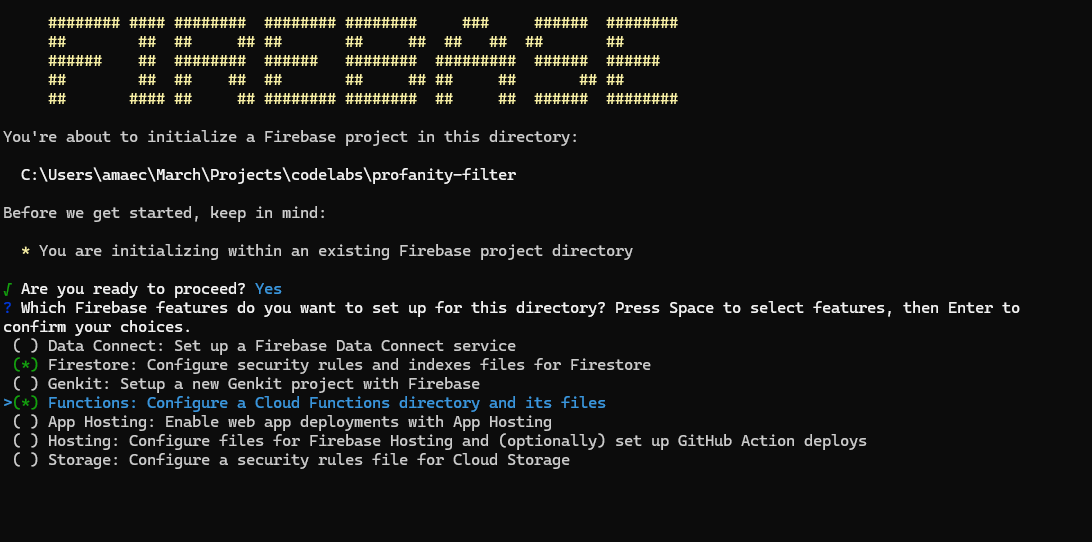
Select the following options:
- ✅ Firestore: Configure security rules and indexes files
- ✅ Functions: Configure a Cloud Functions directory and files
Project Structure
After initialization, your project should look like this:
profanity-filter/
├── firebase.json
├── firestore.rules
├── firestore.indexes.json
└── functions/
    ├── main.py
    └── requirements.txt
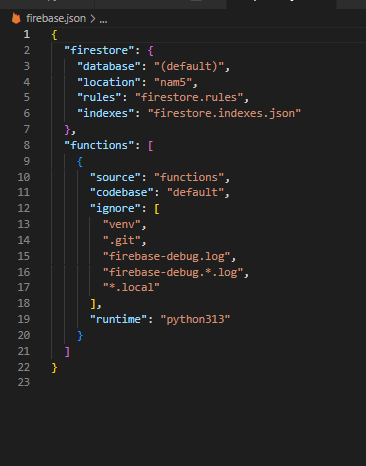
Update firebase.json
Configure your Firebase project settings (It might be auto-configured already):
{
  "firestore": {
    "database": "(default)",
    "location": "nam5",
    "rules": "firestore.rules",
    "indexes": "firestore.indexes.json"
  },
  "functions": [
    {
      "source": "functions",
      "codebase": "default",
      "ignore": [
        "venv",
        ".git",
        "firebase-debug.log",
        "firebase-debug.*.log",
        "*.local"
      ],
      "runtime": "python313"
    }
  ]
}
Configure the Firebase Emulators (Optional)
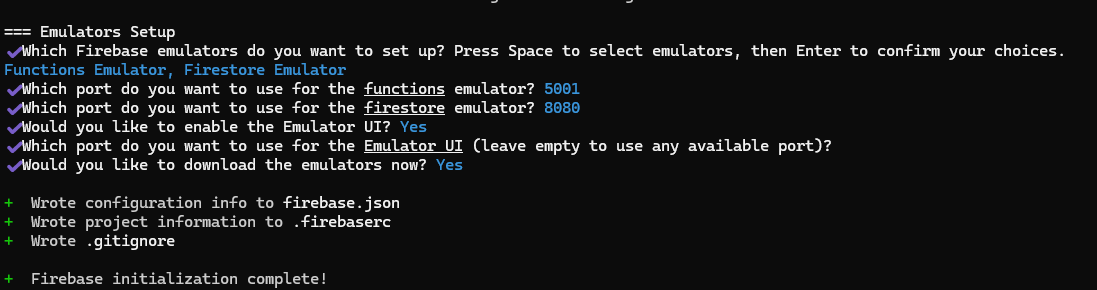
You can configure the Functions and Firestore emulators during firebase init so you can run and test your function locally without deploying.
When asked during initialization, select Functions Emulator and Firestore Emulator, enable the Emulator UI, and choose the ports (defaults are shown in the prompts). The initialization writes configuration to firebase.json and .firebaserc and will download the emulator binaries if you confirm.
Example prompts you may see during setup:

After choosing options and confirming the download you should see confirmation that initialization completed:
What this does for you:
- Adds emulator configuration to
firebase.jsonand project info to.firebaserc - Creates or updates
.gitignoreto avoid committing emulator binaries - Enables a local Emulator UI (typically available at http://127.0.0.1:4000)
Python dependencies (requirements.txt)
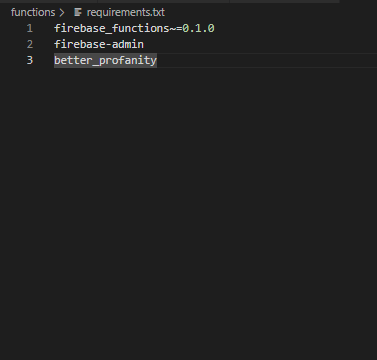
Update the existing requirements.txt file inside the functions directory with any packages your function needs — the repository already includes this file at functions/requirements.txt.
Example (recommended minimum):
firebase_functions~=0.1.0
firebase-admin
better_profanity
Edit functions/requirements.txt if you need to add or bump packages.
Install dependencies locally (optional, recommended for testing)
For fast, safe local development create and activate a virtual environment inside the functions folder, then install dependencies.
Windows (PowerShell):
cd functions
python -m venv .venv
# Activate the venv
.\.venv\Scripts\Activate.ps1
# (Optional) upgrade pip
python -m pip install --upgrade pip
# Install dependencies
pip install -r requirements.txt
macOS / Linux (bash):
cd functions
python3 -m venv .venv
source .venv/bin/activate
python -m pip install --upgrade pip
pip install -r requirements.txt
Notes and tips:
- Use
.venv(dot-prefixed) to keep the venv hidden and consistent with many editors. - Always run the
pip installstep while the virtual environment is active so packages are isolated from your system Python. - If you see a permissions error on Windows activating the venv, run PowerShell as Administrator, or run
Set-ExecutionPolicy -Scope CurrentUser -ExecutionPolicy RemoteSigned -Forceonce to allow script execution. - When using the emulator, run
firebase emulators:startfrom the project root (not insidefunctions) so both Functions and Firestore emulators pick up the project config infirebase.json.
Create the Profanity Filter Function
Replace the contents of functions/main.py:
# Welcome to Cloud Functions for Firebase for Python!
# To get started, simply uncomment the below code or create your own.
# Deploy with `firebase deploy`
from firebase_functions import firestore_fn
from firebase_functions.options import set_global_options
from firebase_admin import initialize_app, get_app
from better_profanity import profanity

_app_initialized = False

def ensure_firebase_initialized():
    """Lazy initialization of Firebase Admin SDK."""
    global _app_initialized
    if not _app_initialized:
        try:
            get_app()  # Check if app already exists
        except ValueError:
            initialize_app()  # Initialize if it doesn't exist
        _app_initialized = True


@firestore_fn.on_document_created(document="messages/{pushId}")
def profanity_filter(event: firestore_fn.Event[firestore_fn.DocumentSnapshot | None]) -> None:
    """
    Listens for new messages, checks them for profanity, and adds a
    sanitized version and a flag.
    """
    if event.data is None:
        print("No document data found.")
        return

    original_text = event.data.get("text")

    if not isinstance(original_text, str):
        print(f"Document {event.params['pushId']} is missing 'text' field or field is not a string. No action taken.")
        return

    try:
        # Censor the text using the library
        sanitized_text = profanity.censor(original_text)

        # Check if the text was changed (i.e., if profanity was found)
        was_profane = original_text != sanitized_text

        print(f"Original: '{original_text}', Sanitized: '{sanitized_text}', Was Profane: {was_profane}")

        # Write the new fields back to the document
        event.data.reference.update({
            "sanitized_text": sanitized_text,
            "is_profane": was_profane
        })

        print(f"Successfully updated document {event.params['pushId']}")

    except Exception as e:
        print(f"Error processing document {event.params['pushId']}: {str(e)}")
        # Optionally, you could write an error flag to the document
        try:
            event.data.reference.update({
                "processing_error": True,
                "error_message": str(e)
            })
        except Exception as update_error:
            print(f"Failed to update document with error info: {str(update_error)}")
Function Breakdown
Let's understand what this function does:
- Trigger:
@firestore_fn.on_document_created(document="messages/{pushId}")- Triggers when a new document is created in themessagescollection - Validation: Checks if the document has a
textfield that's a string - Processing: Uses the
better-profanitylibrary to detect and censor inappropriate content - Update: Adds two new fields to the document:
sanitized_text: The cleaned version of the textis_profane: Boolean flag indicating if profanity was found
- Error Handling: Catches and logs errors, optionally writing error information back to the document
Before deploying to production, you can test your function locally using the Firebase Emulator Suite. This allows you to validate your function behavior without incurring cloud costs.
Set Up the Emulator
- Start the emulators:
firebase emulators:start
This will start both the Firestore and Functions emulators. You should see output similar to:
┌─────────────────────────────────────────────────────────────┐
│ ✔  All emulators ready! It is now safe to connect your app. │
│ i  View Emulator UI at http://127.0.0.1:4000/               │
└─────────────────────────────────────────────────────────────┘

┌────────────────┬────────────────┬─────────────────────────────────┐
│ Emulator       │ Host:Port      │ View in Emulator UI             │
├────────────────┼────────────────┼─────────────────────────────────┤
│ Functions      │ 127.0.0.1:5001 │ http://127.0.0.1:4000/functions │
│ Firestore      │ 127.0.0.1:8080 │ http://127.0.0.1:4000/firestore │
└────────────────┴────────────────┴─────────────────────────────────┘

Test Your Function
- Open the Emulator UI: Navigate to
http://127.0.0.1:4000/in your browser - Go to Firestore: Click on the Firestore tab in the emulator UI
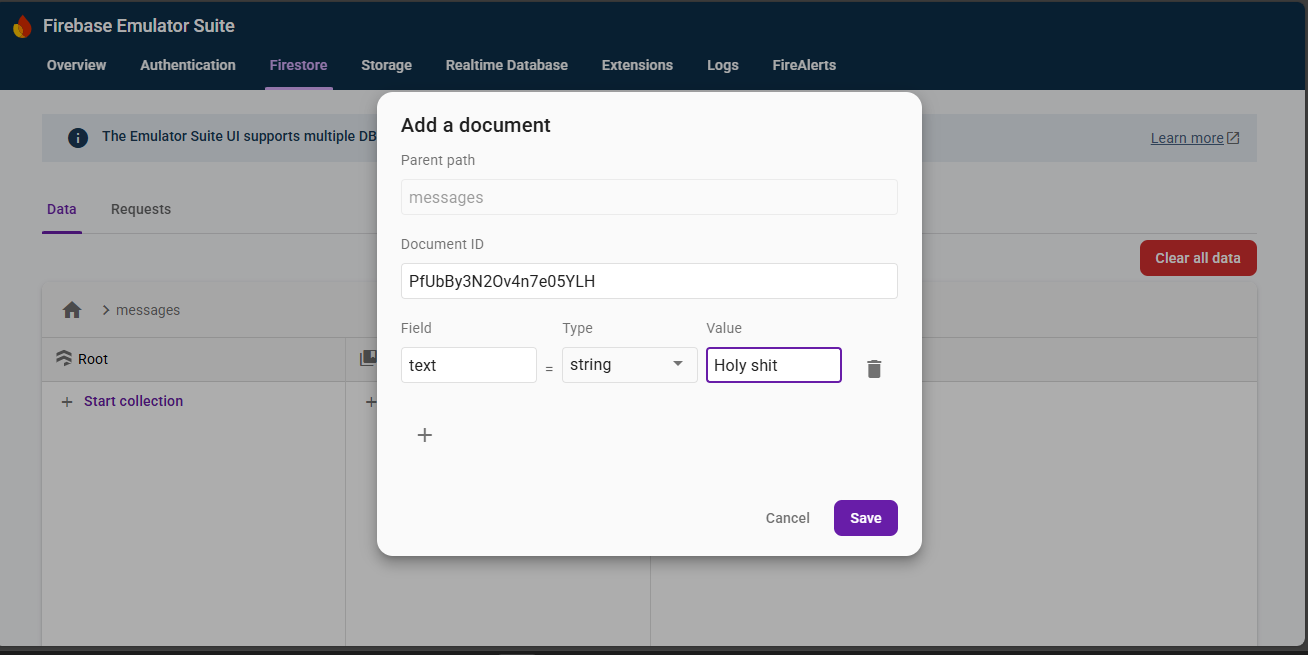
- Create a test document:
- Click "Start collection"
- Collection ID:
messages - Document ID: (auto-generate or specify)
- Add a field:
text(string) with value like "This is a damn test message" - Click "Save"
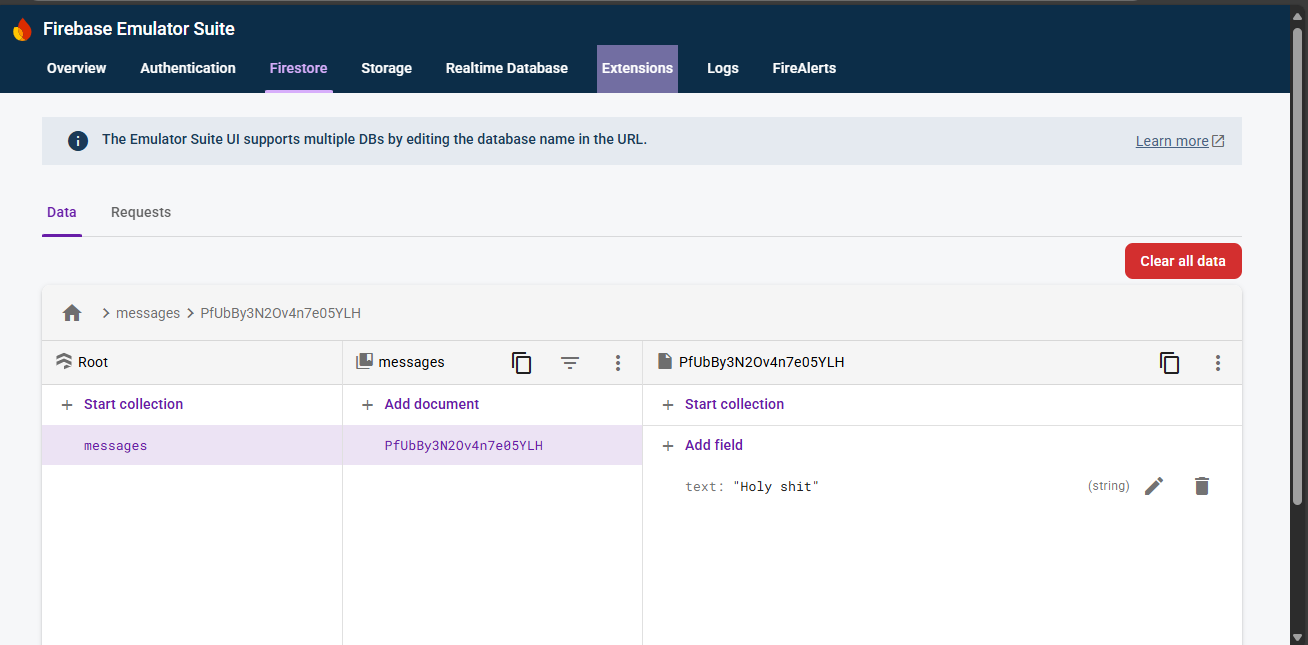
- Monitor the function execution:
- Switch to the Functions tab to see logs
- Go back to Firestore to see the updated document with
sanitized_textandis_profanefields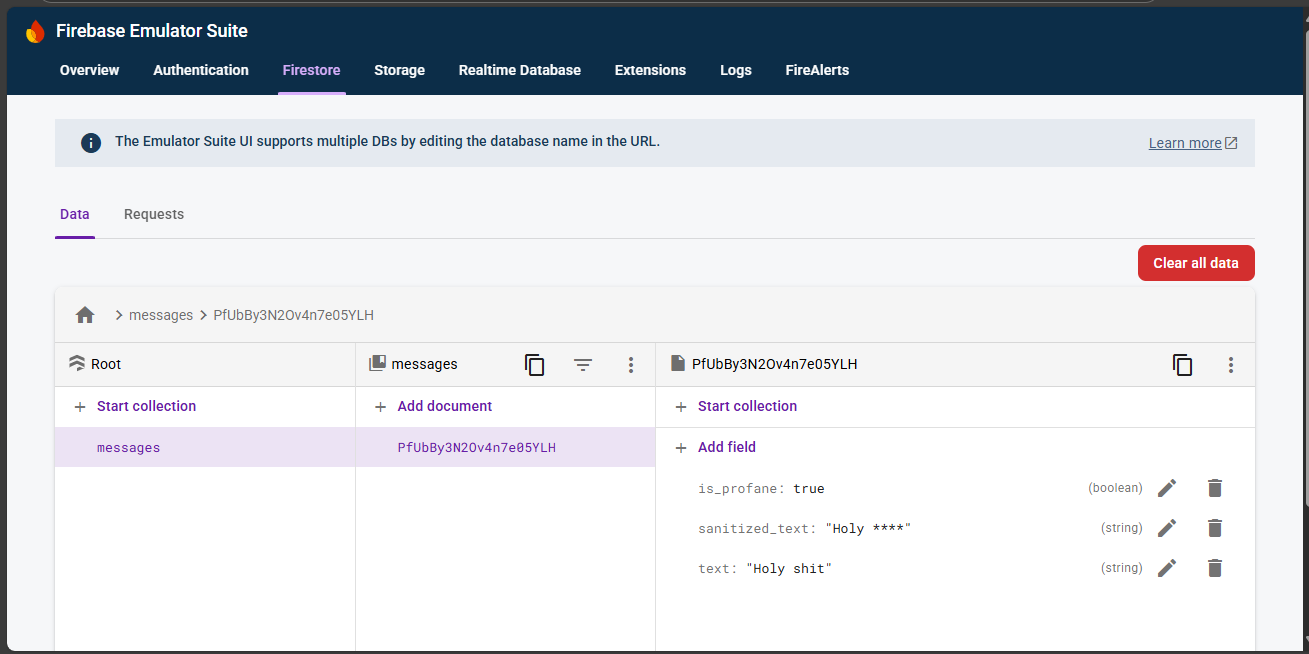
Benefits of Emulator Testing
- Fast iteration: No deployment time
- Cost-free: No charges for function executions
- Debugging: Better local debugging capabilities
- Offline development: Work without internet connection
Deploy to Firebase
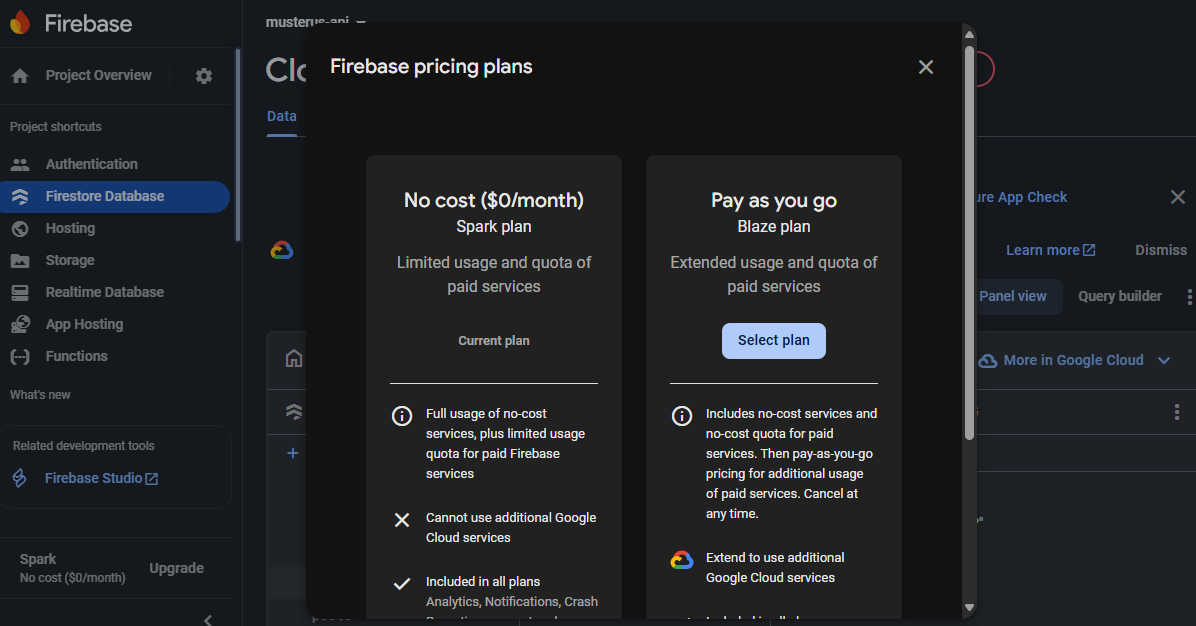 From your project root directory, (ensure you are not thing the functions directory/folder), deploy the function:
firebase deploy --only functions
You should see output similar to: 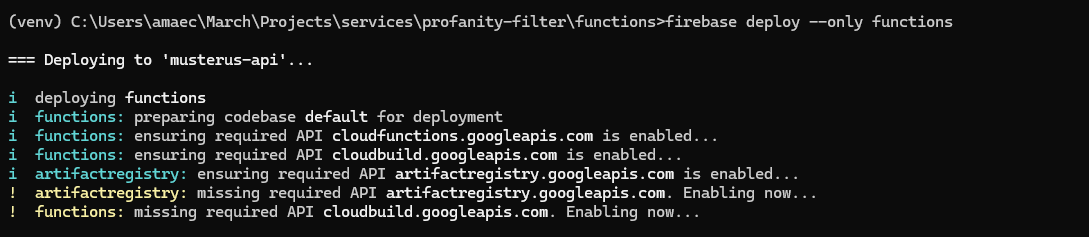
=== Deploying to 'your-project-id'...

i  deploying functions
✔  functions: Finished running predeploy script.
i  functions: ensuring required API cloudfunctions.googleapis.com is enabled...
✔  functions: required API cloudfunctions.googleapis.com is enabled
i  functions: ensuring required API cloudbuild.googleapis.com is enabled...
✔  functions: required API cloudbuild.googleapis.com is enabled
i  functions: preparing functions directory for uploading...
i  functions: packaged functions (X KB) for uploading
✔  functions: functions folder uploaded successfully
i  functions: creating Python function profanity_filter...
✔  functions[profanity_filter]: Finished running predeploy script.
✔  functions[profanity_filter]: functions deployed successfully.

✔  Deploy complete!
Firebase Console
- Open the Firebase Console
- Navigate to Firestore Database
- Create a new document in the
messagescollection:
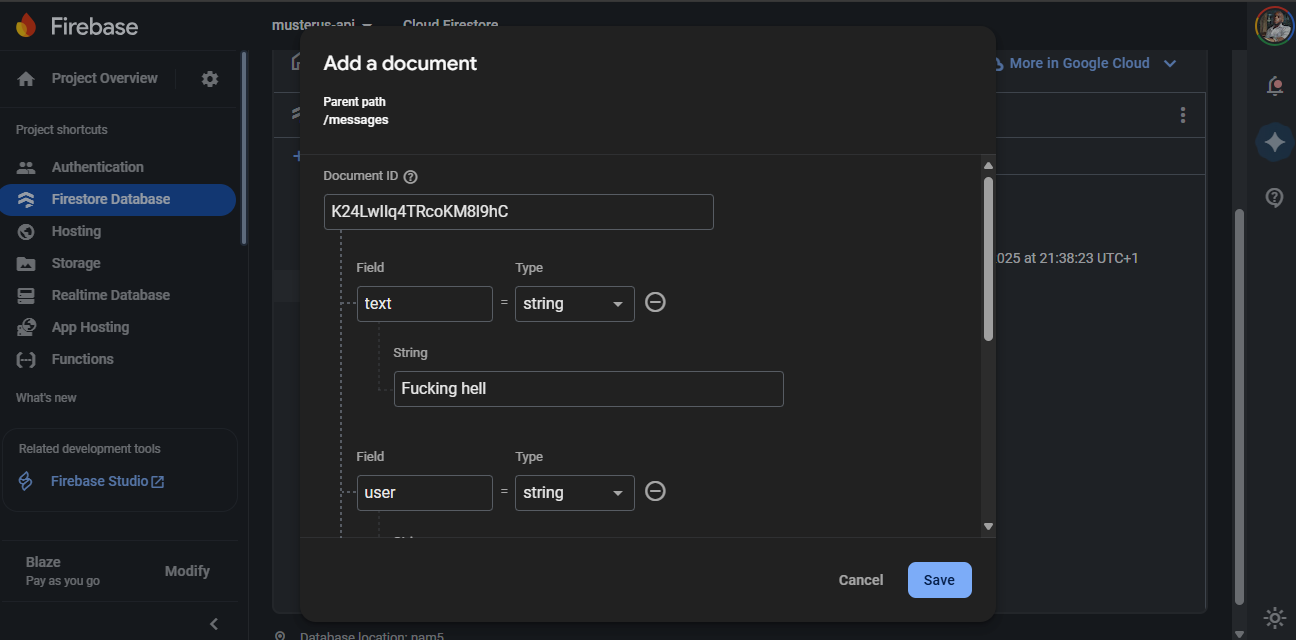
{
  "text": "This is a damn test message",
  "user": "testuser",
  "timestamp": "2024-01-01T12:00:00Z"
}
- Watch as the function automatically adds the new fields:
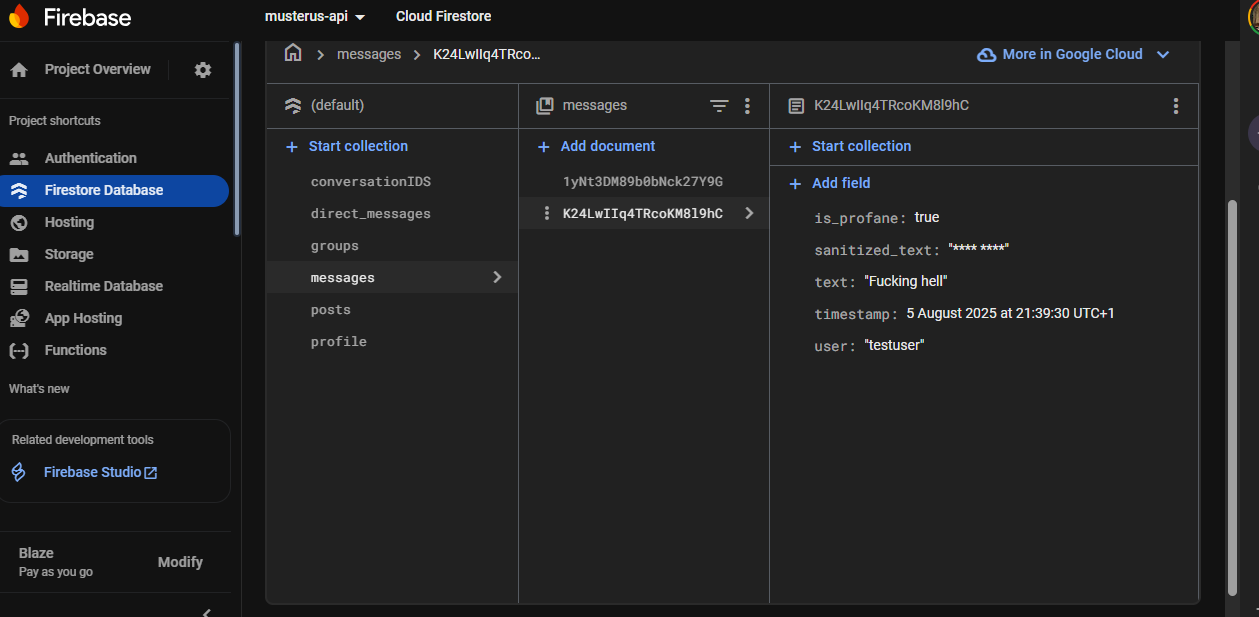
View Function Logs
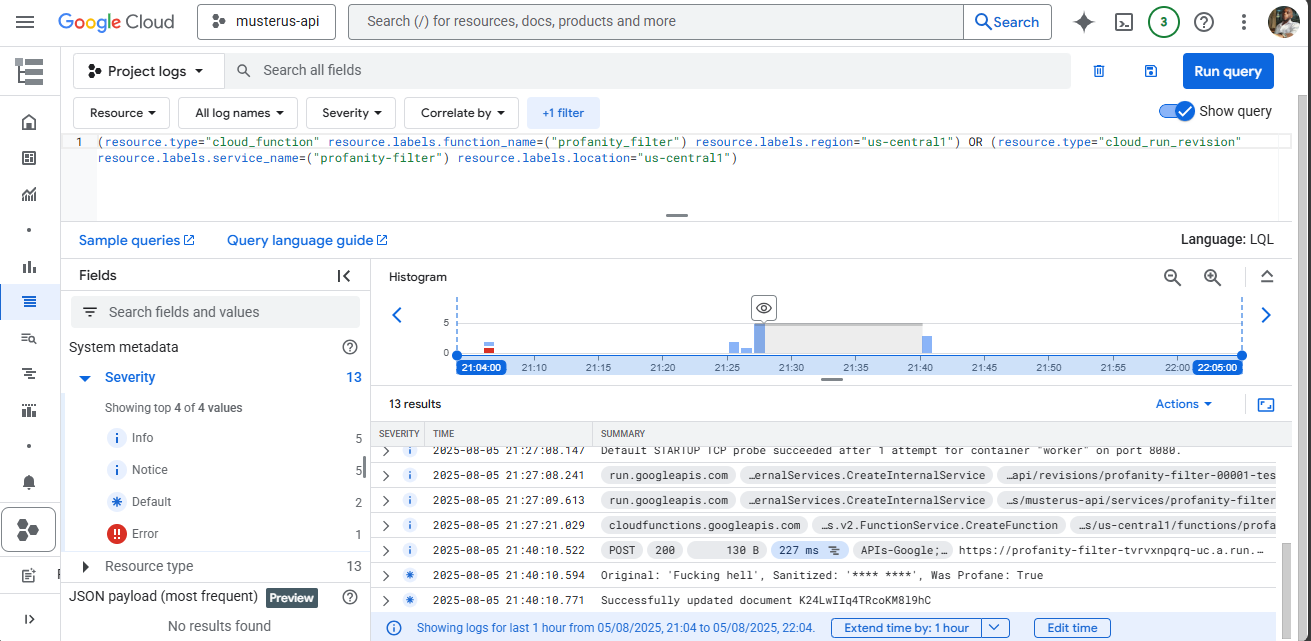
- In Firebase Console, go to Functions
- Click on your
profanity_filterfunction - View logs to see function execution details
Common Test Cases
Test your function with various inputs:
- Clean text: "Hello world" → Should not be flagged
- Profanity: "This is damn annoying" → Should be censored
- Mixed content: "What the hell is going on?" → Should be partially censored
- No text field: Document without
text→ Should be ignored - Non-string text:
{"text": 123}→ Should be ignored
Congratulations! You've successfully built a real-time profanity filter using Firebase Cloud Functions. Your function now:
✅ Automatically triggers when new messages are added to Firestore ✅ Detects and censors inappropriate content ✅ Adds metadata about content moderation ✅ Handles errors gracefully ✅ Scales automatically with Firebase
What You've Learned
- How to create and deploy Firebase Cloud Functions with Python
- Firestore triggers and real-time document processing
- Text processing and content moderation techniques
- Error handling in serverless environments
- Testing and debugging cloud functions
Next Steps
- Implement custom word lists for your specific use case
- Add user reporting mechanisms
- Create a moderation dashboard
- Integrate with other Firebase services like Authentication
- Add machine learning for more sophisticated content analysis
Resources
Common Issues
Function not triggering:
- Check that documents are being added to the correct collection (
messages) - Verify function deployment was successful
- Check Firebase Console logs for errors
Permission errors:
- Ensure Firebase Admin SDK is properly initialized
- Check Firestore security rules
- Verify project billing is enabled
Dependencies not found:
- Ensure
requirements.txtincludes all necessary packages - Check Python runtime version in
firebase.json
Timeout errors:
- Implement lazy initialization
- Optimize function code
- Increase timeout in function configuration
Happy coding! 🚀